|
|
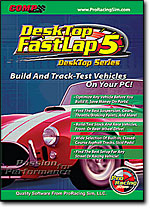 DeskTop
FastLap5
accurately simulates the unimaginably complex interaction of forces, speeds,
and accelerations generated by any stock, high-performance, or all-out race
vehicle. A comprehensive step-by-step analysis of the interrelated physics
is performed during every increment of vehicle motion (full analysis is
completed 1000 times per second!).
DeskTop FastLap5
derives an optimum driving
path, and determines the best braking points and forces, aerodynamics,
throttle positions, transmission shift-up and shift-down points, steering
input, driver corrections, and more! Further analysis determines the best
possible elapsed time for any track.
Change any component in seconds and run back-to-back
tests to “home in” on the ultimate setup for any vehicle and track.
Accurate, easy-to-use, state-of- DeskTop
FastLap5
accurately simulates the unimaginably complex interaction of forces, speeds,
and accelerations generated by any stock, high-performance, or all-out race
vehicle. A comprehensive step-by-step analysis of the interrelated physics
is performed during every increment of vehicle motion (full analysis is
completed 1000 times per second!).
DeskTop FastLap5
derives an optimum driving
path, and determines the best braking points and forces, aerodynamics,
throttle positions, transmission shift-up and shift-down points, steering
input, driver corrections, and more! Further analysis determines the best
possible elapsed time for any track.
Change any component in seconds and run back-to-back
tests to “home in” on the ultimate setup for any vehicle and track.
Accurate, easy-to-use, state-of-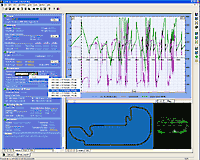 the-art
and great fun;
DeskTop FastLap5
is an awesome simulation that, we are sure, will become the most valuable
addition to your racer’s toolkit. the-art
and great fun;
DeskTop FastLap5
is an awesome simulation that, we are sure, will become the most valuable
addition to your racer’s toolkit.
DeskTop FastLap5
incorporates ProRacing Sim Software’s new user interface built from the
ground-up for Windows95/98/Me/XP or Vista. QuickAccess™ buttons and
DirectClick™ menus that let you change parts simply by clicking on any
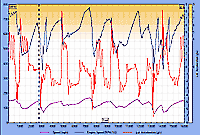
component. Nothing could be easier! Analyze vehicle speed, lateral or
longitudinal G's,
rpms, damper forces, suspension movement, tire loads, and much more.
View race results in full-color graphics. All data and graphs can be printed
(and previewed) in color on any Windows printer.
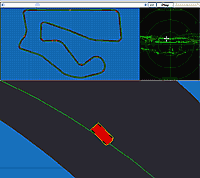 DeskTop
FastLap5
also includes a Track Window that provides an “overhead” view of
real-time vehicle movement (showing all vehicle motion, including understeer,
oversteer, and driver corrections!). Watch as your test
vehicle traverses every straightaway and turn and remains
fully synchronized with the comprehensive telemetry
displayed on the results
graphs. Zoom-in and out on both Track and Telemetry to uncover every nuance
of vehicle performance.
DeskTop FastLap5
also provides a real-time G-G Diagram that graphically indicates the sum of
all forces acting on the vehicle. Each dot on the G-G Diagram indicates the
equivalent force on the vehicle at each 0.001-second throughout the timed
lap. DeskTop
FastLap5
also includes a Track Window that provides an “overhead” view of
real-time vehicle movement (showing all vehicle motion, including understeer,
oversteer, and driver corrections!). Watch as your test
vehicle traverses every straightaway and turn and remains
fully synchronized with the comprehensive telemetry
displayed on the results
graphs. Zoom-in and out on both Track and Telemetry to uncover every nuance
of vehicle performance.
DeskTop FastLap5
also provides a real-time G-G Diagram that graphically indicates the sum of
all forces acting on the vehicle. Each dot on the G-G Diagram indicates the
equivalent force on the vehicle at each 0.001-second throughout the timed
lap.
 A
quick glance reveals whether vehicle was able to maintain its maximum G
“envelope” throughout the course. Use this data, and the extensive
chassis-tuning information provided in the over 160-page, color, Users
Manual, to build the ultimate vehicle for any asphalt, closed-course track. A
quick glance reveals whether vehicle was able to maintain its maximum G
“envelope” throughout the course. Use this data, and the extensive
chassis-tuning information provided in the over 160-page, color, Users
Manual, to build the ultimate vehicle for any asphalt, closed-course track.
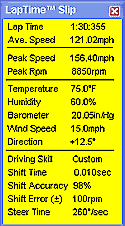 Pop-Up
Lap-Time Slip™
offers an instant summary of the performance potential of any vehicle. Pop-Up
Lap-Time Slip™
offers an instant summary of the performance potential of any vehicle.
DeskTop FastLap5
also accepts
DeskTop Dyno5
and
DynoSim5
engine test files (you can also manually enter any engine power curves), it
is possible to test various engine components and measure
their on-track effects. Imagine changing a camshaft then running a track
analysis of the new power curve in just minutes! In the time it takes for
you to dream up a new combination, you can perform an "on track" test and
analyze the results!
The Track Editor™:
You can run any vehicle you design on any of the 40+ built-in tracks
(includes many of the World’s best-known race courses). Or design any track
you can dream up using a fully-graphic Track Editor™!
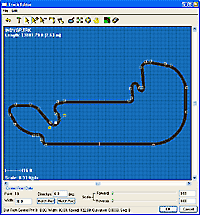 This
powerful “application” built into
DeskTop FastLap5
lets you construct any track with any number of turns, turn radii,
straightaway lengths, track widths, and more. Simply place corner points and
the Track Editor draws the interconnecting track.
Set the
corner radii, fine tune the track points, and take your test vehicle for a
“spin.” Build any track from a parking-lot autocross to a multi-mile
twister! Build an imaginary track, or precisely construct a real-world track
for methodical testing. Either way, the Track Editor expands the modeling
capabilities of
DeskTop FastLap5
to limits of your imagination! This
powerful “application” built into
DeskTop FastLap5
lets you construct any track with any number of turns, turn radii,
straightaway lengths, track widths, and more. Simply place corner points and
the Track Editor draws the interconnecting track.
Set the
corner radii, fine tune the track points, and take your test vehicle for a
“spin.” Build any track from a parking-lot autocross to a multi-mile
twister! Build an imaginary track, or precisely construct a real-world track
for methodical testing. Either way, the Track Editor expands the modeling
capabilities of
DeskTop FastLap5
to limits of your imagination!
DeskTop FastLap5
is supplied with a full-color, 150-page, on-disk Users Manual (directly
accessible from within the program) that details the features of this
comprehensive simulation.
DeskTop FastLap5
runs on any IBM-compatible PC computer using WindowsXP/Vista or Win7 & 8.
DeskTop FastLap5
is available NOW! See our
Order Form
for purchase information and Discount Web pricing.
What You Can Do With
DeskTop FastLap5:
-
Design, Build, And
Track-Test Any Vehicle In Seconds
-
Pick From List Of
Tracks Or Design Any Closed Course
-
Design Any Track,
Any Number Turns, Ovals, Autocrosses!
-
Displays Real-Time
Runs From Overhead Track View
-
See The Potential
Of Any Component Combination
-
Displays Full
Telemetry Data For Each Run
-
Test Any Engine
Power Curve And/Or Import DynoSim5 And DeskTop Dyno5 Engine Files
-
Evaluate Wide
Range Of Suspension Components
-
Test Drivelines,
Gear Ratios, Tires, Wheels, And More!
-
Evaluate Wing And
Body Aerodynamics, Lift And Drag
-
Display & Print
Vehicle Specs, Telemetry, Performance
-
Run Back-To-Back
Tests And Find Best Combinations
-
Easy-To-Use,
Advanced Data-Entry Interface
-
Plus Automatic Updates
Over The Web!
Tune These Key Elements:
-
Any
Closed-Course Track
-
Any Vehicle, Wheelbase,
Weight, Aero Properties
-
Front/Rear Track Width, CG Location
-
Front And/Or Rear Wing
Length, Width, Angle
-
Any
Engine Power Curve Or Load DynoSim Engine Files
-
1- to
6-Speed Transmissions, Clutch Or Automatic
-
Any
Transmission Or Rear-Axle Ratios
-
Front- Or Rear-Wheel
Drive
-
Any Spring Rate,
Damper, Tires, Brakes
-
A-Arms, Struts, Swing,
Or Custom Suspension Geometry
-
Front And Rear
Anti-Roll Bar Rates With Calculator
-
Brake Bias Adjustable
Front/Rear
-
Driving Styles, Driver
Error Considerations
-
Driver Steering
Response Time, Shift Time
-
Temperature, Humidity, Wind, Elevation
-
And More! Our Most
Cost-Effective Vehicle-Dynamics Simulation!
|
|
Special Web Pricing And
Package Deals Available Now!
FastLap5 Highlights:
-
Watch Any Vehicle You’ve Designed Run A “Hot Lap” On Any Closed-Course
Track!
-
Use
Any Of 40+ Built-In Tracks Or Build Your Own In Graphic
Track Editor™.
-
Find
Optimum Suspension, Gear Ratios, Aerodynamics, Driveline, Tires, And
More!.
-
Build Stock Cars, Street Racers, Race Sedans, Nascar Vehicles,
Open-Wheel Racers, And More
-
QuickAccess™ Buttons, Precision Data Display With Reticule, 160-Page
Color Users Manual, And More!
Program Features:
-
Design, Build, And
Track-Test Any Vehicle In Seconds
-
Pick From List Of
World’s Most Well-Known Tracks Or Design Any Closed Course Using
Built-In
TrackEditor™
-
Watch Real-Time “Hot
Laps” From Overhead Track View; Zoom In To Catch All The Action!
-
Display & Print
Vehicle Telemetry, Specs, and Overall Performance
-
Test Potential Of Any
Component Combination
-
Test Any Engine Power
Curve And/Or Load DeskTop Dyno and DynoSim Engine Files
-
Evaluate Wide Range Of
Suspension Setups; tune each wheel individually
-
Build Coil Spring,
Strut, Torsion Bar, A-Arm, Or Swing Suspension Systems
-
Choose Spring Rates,
Dampers, Geometry, Tires, Brakes. Graphs Show Under-, Over-,
Critical-Damping.
-
Test Drivelines,
Suspension, Gear Ratios, Tires, Wheels, Driving Styles, Weather, And
Much More!
-
Run Back-To-Back Tests
And Find The Best Setups
-
Optimize Any Vehicle
BEFORE You Build It; Save Thousands On Parts!
-
Select Parts From
Built-In Menus Or Enter Your Own Custom Specs
-
Easy-To-Use,
DirectClick™ Menu Interface
-
Any Vehicle, Weight,
Frontal Area, Drag, Lift, Wheelbase, Wings, CG Location
-
Any Trans, Manual or
Automatic, 1-to-6 Gears, Any Ratios, Front Or Rear Wheel Drive Vehicles
-
Use Pop-Up Lap
TimeSlip™ For Fast Overview Of Vehicle Performance
-
Advanced Graphics
Displays Any Of 70 Telemetry Data Sets Recorded During Vehicle Testing!
Playback Lap, Zoom-In, Study Every Detail Of Vehicle Performance.
-
Advanced Windows
Interface With Easy-To-Use, DirectClick™ Menus And Enhanced “XP”
Graphics
-
Model
Front-Or-Rear-Wheel Drive Vehicles
-
Accurate, Easy-To-Use,
State-Of-The-Art, And Fun!. The FastLapSim Is The Best Road-Course
Vehicle Dynamics Simulation You Can Buy!
Requirements:
- Any PC system capable of running
WindowsXP/Vista & Win7 & 8
- Faster system processor determines
simulation results more quickly
- Basic VGA video
capability (640 x 480), however, 800 x 600, 1024 x 768 or higher
resolution recommended
- A
complete install requires approximately 120MBytes of disk space.
- CD-ROM disk drive
- Mouse
- Windows-Compatible
Printer required for test reports
|